
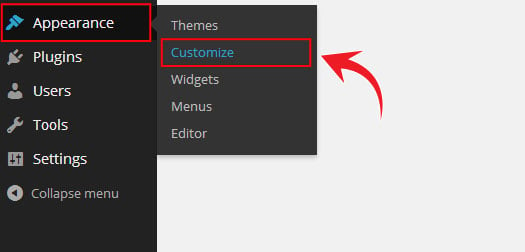
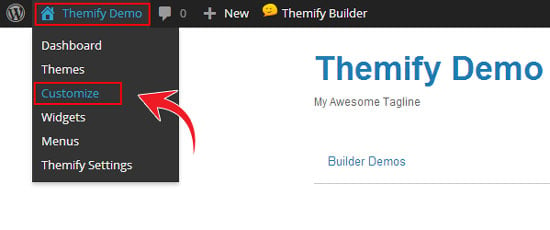
1) Access the Themify Customize Panel from the back-end or the front-end of your site.
Back-end
Front-end
2) Click on the Site Logo & Tagline tab.
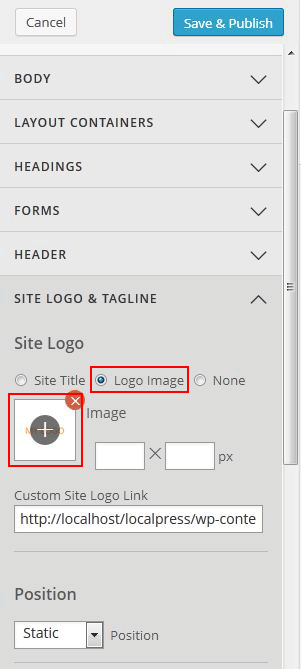
Here you can change the site logo, site title and site tagline.
Site Logo Image
- Under "Site Logo", select "Logo Image" radio button
- Click on the plus (+) sign button, and upload a logo image
- You can also use custom site logo link (optional)
- Specify the image width and height
- To reposition the logo accordingly, choose the appropriate position from the Position dropdown, enter the values in "top," "right," "bottom," and "left" position.
Site Description (Tagline)
- Edit or remove the text in the Tagline field
- You can customized your site's tagline using customized fonts, text effects, alignments, and colors from the available dropdown options.
To reposition the site description:
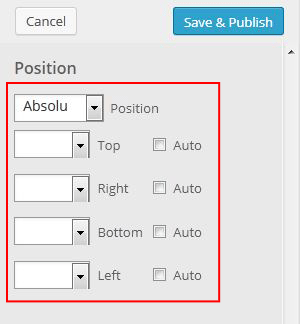
Choose the appropriate position from the Position dropdown, enter the values accordingly in "top," "right," "bottom," and "left" position.

Original post: https://themify.me/docs/styling